How Source Code Becomes a Running Program: The Compilation Pipeline
How Source Code Becomes a Running Program
When you write a program in a language like C or C++, you type words and symbols that humans can read. But the computer's processor (the CPU) does not understand those words. It only understands very simple instructions written in machine code — long strings of 0s and 1s.
So there must be a translator that turns your human-friendly code into something the CPU can run. That translator is not a single tool. It is a small pipeline — a series of stages, where each stage takes the output of the previous one and gets it one step closer to a finished program.
Think of it like a factory assembly line. Raw material (your source code) goes in one end. It passes through several stations, each doing one specific job. At the other end, a finished product (a runnable program) comes out.
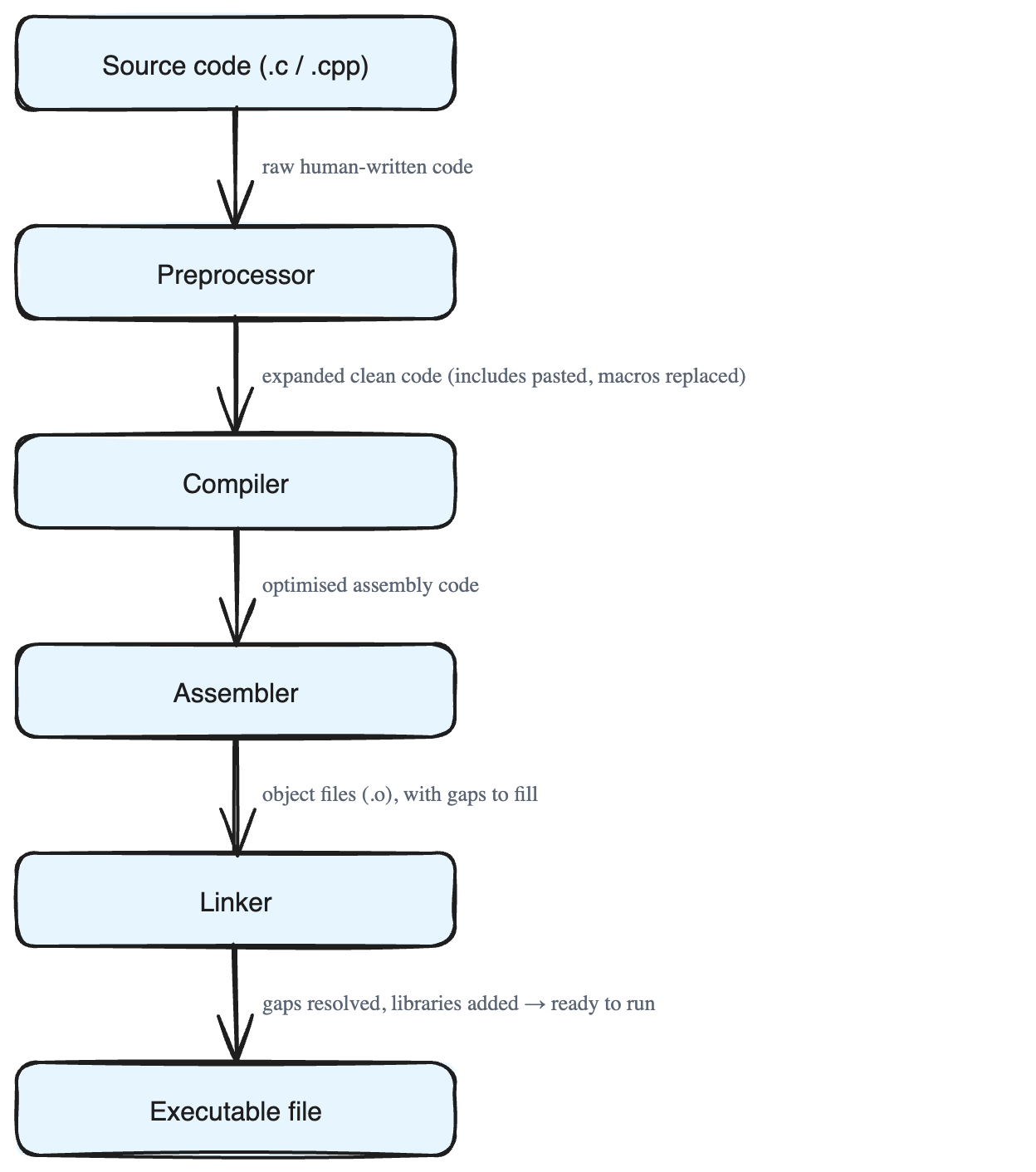
The pipeline has four main stages:
- Preprocessing
- Compilation
- Assembly
- Linking
Let's walk through each one.
Stage 1: Preprocessing
The very first stop is the preprocessor. Its job is to clean up and prepare your code *before* the real translation starts.
In C and C++, some lines begin with a # symbol. These are called directives — special instructions for the preprocessor (not for the CPU). Two common ones are:
#include— this pulls in the contents of another file (called a header file) and pastes it right into your code. For example,#include <stdio.h>brings in the code needed to print things to the screen.#define— this creates a macro, which is like a find-and-replace shortcut. If you write#define PI 3.14, then every time you usePIin your code, the preprocessor swaps it for3.14.
Why is this useful? It lets you split your work into small, reusable pieces and keep your files tidy. The preprocessor stitches everything together for you.
The output of this stage is an expanded version of your source code: all the included files are pasted in, all the macros are replaced, and any optional sections are turned on or off. The result is one clean, complete piece of code, ready for the next stage. Doing this early also helps catch mistakes before they cause bigger problems later.
Stage 2: Compilation
Now the cleaned-up code goes into the compiler — the heart of the whole process. The compiler translates your high-level code into assembly code.
Assembly is a low-level language. It is still readable by a human, but it is much closer to the CPU. Each assembly instruction maps directly to something the processor can do.
The compiler does this in several smaller steps:
- Lexical Analysis (Tokenisation). The code is chopped into tokens — the smallest meaningful pieces. A token can be a keyword (like
int), an identifier (a name you chose, likecount), an operator (like+), or a literal (a fixed value, like5). This is like breaking a sentence into individual words.
- Syntax Analysis (Parsing). The compiler checks that the tokens are arranged according to the rules (the grammar) of the language. Just like an English sentence needs correct word order, your code must follow the language's structure. The compiler organizes the tokens into a parse tree (also called an Abstract Syntax Tree, or AST) that captures the shape of your program.
- Semantic Analysis. Here the compiler checks whether the code actually *makes sense*. For example, are you trying to add a number to a word? Did you use a variable correctly? Did you call a function the right way? This catches logical mistakes, not just spelling ones.
- Intermediate Code Generation & Optimisation. The compiler creates an in-between version of your program and then optimises it — meaning it makes it faster and leaner. It removes calculations that aren't needed, reorders instructions, and tries to use memory and the CPU more efficiently.
After this stage, your program exists as optimised assembly code: low-level, readable, and ready to become real machine instructions.
Stage 3: Assembly
Next, the assembly code is handed to the assembler. Its job is simple but important: turn the human-readable assembly into actual machine code.
Assembly uses short word-like codes called mnemonics for CPU operations — for example, MOV (move data), ADD (add), and JMP (jump to another instruction). The assembler converts these mnemonics and their symbolic addresses into the binary 0s and 1s the CPU truly runs.
The result of this stage is one or more object files (with names ending in .o or .obj). Each object file holds the finished machine code for a part of your program.
But there's a catch. An object file may still have unresolved references — gaps where it calls a function or uses something that lives in *another* file or in an outside library. These are like placeholders that say, "the real code for this goes here, but I don't have it yet." Something still needs to fill in those blanks.
This is also why splitting a program into separate files is so handy: each file can be compiled on its own, and only the parts you changed need to be redone. This makes large projects easier to manage.
Stage 4: Linking
The final stage belongs to the linker. Its main job is to combine all the object files into a single executable — the finished program you can actually run.
The linker also pulls in code from outside sources: pre-built system libraries and any third-party libraries your program depends on. This guarantees the final program contains *everything* it needs.
The linker's most important task is to resolve the unresolved references left over from the assembly stage. Remember those placeholder gaps? The linker patches them, making sure every function call and every piece of data points to the correct address in memory. Without this step, the program would be full of dangling links and could not run.
Beyond that, the linker can do extra work too: arranging code and data neatly in memory, handling relocation (adjusting addresses when needed), and sometimes optimising the combined code for even faster execution.
Putting It All Together
So the journey of your program looks like this:
- You write source code.
- The preprocessor expands and cleans it.
- The compiler turns it into optimised assembly code.
- The assembler turns that into object files of machine code.
- The linker combines everything (plus libraries) into one runnable executable file.
Each stage has one clear job, and together they reliably transform human-readable instructions into a program the CPU can run directly.