Operations on Multidimensional Arrays: Create, Access, Modify, and Traverse
Working With Multidimensional Arrays
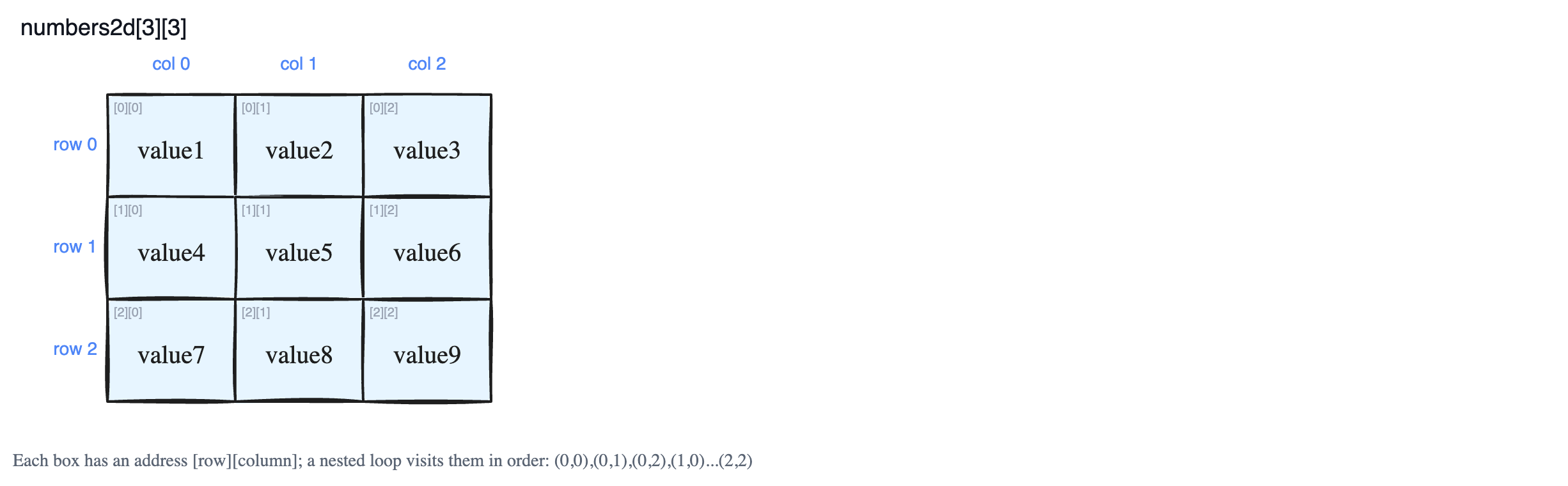
A multidimensional array is just an array whose items are themselves arrays. Think of a 2D array as a grid of boxes arranged in rows and columns, like a spreadsheet. Once you understand how to build it, read from it, change it, and walk through every box, you can handle arrays of any number of dimensions. The good news: in almost every programming language these operations work the same way, and they are simply an extension of what you already do with a normal one-dimensional array.
1. Construction (Creating the Array)
When you create a multidimensional array, you usually decide two things up front:
- Its size — how many rows and columns (and depth, if 3D).
- Its data type — every box must hold the same type of value (for example, all whole numbers).
A real array has a fixed size. Once it is created, you cannot make it bigger or smaller, and you cannot mix types. This is true in lower-level languages like C++ and Java.
In C++, you can declare an array without filling it in yet, or you can fill it in right away:
// 1. Declaring a 2D array of size 2x3 (uninitialized)
int numbers2d[2][3];

// 2. Declaring a 3D array of size 2x3x2 (uninitialized)
int numbers3d[2][3][2];

// 3. Initializing a 2D array
int numbers2d_init[2][3] = { {1, 2, 3}, {4, 5, 6} };

// 4. Initializing a 3D array
int numbers3d_init[2][3][2] = {
    { {1, 2}, {3, 4}, {5, 6} },
    { {7, 8}, {9, 10}, {11, 12} }
};
Notice how numbers2d[2][3] reads as "2 rows, each with 3 numbers." A 3D array like numbers3d[2][3][2] is just two of those 2D grids stacked together — picture two pages, each page a small table.
Higher-level languages like JavaScript and Python behave a little differently. They don't give you a true fixed array; instead they give you a list. A list works like an array, but it can grow or shrink and can even hold different types of values. Because of that, you do not have to state a size when you create a multidimensional list — you just start nesting lists inside lists.
2. Accessing Elements (Reading a Value)
To read a value, you use the subscript operator [] together with an index (a position number that starts at 0). In a multidimensional array, each item is itself an array, so you chain the [] operator — one pair of brackets per dimension — until you reach an actual number.
int numbers2d[2][3] = { {1, 2, 3}, {4, 5, 6} };

// Accessing elements using [row][column]
cout << "Element at (0,0): " << numbers2d[0][0] << endl;  // prints 1
cout << "Element at (1,2): " << numbers2d[1][2] << endl;  // prints 6
Read numbers2d[1][2] as: "go to row 1, then column 2." For a 3D array you add one more bracket, in the order [depth][row][column]. The exact syntax varies between languages, but the underlying idea — pick an index for every dimension — is always the same.
3. Modifying Elements (Changing a Value)
Changing a value works exactly like reading one, except you put the accessor on the left side of the = sign and the new value on the right. You chain [] as many times as there are dimensions to land on the exact box you want, then assign:
// Modifying elements in 2D array
numbers2d[0][0] = 10;   // box at row 0, column 0 becomes 10
numbers2d[1][2] = 60;   // box at row 1, column 2 becomes 60
This updates the value in place — the array stays the same size; only the contents of that one box change.
4. Traversal (Visiting Every Element)
Often you want to do something with every value in the array. For a 1D array you use one loop. For a 2D array you use two nested loops: an outer loop to move through the rows, and an inner loop to move through the columns of the current row. Each extra dimension adds one more nested loop.
int numbers2d[2][3] = { {1, 2, 3}, {4, 5, 6} };

// Index-based for loop (2D)
for (int i = 0; i < 2; i++) {       // pick a row
    for (int j = 0; j < 3; j++) {   // walk across that row
        cout << numbers2d[i][j] << " ";
    }
    cout << endl;                   // new line after each row
}
Here is the order in which the boxes get visited (row by row): (0,0) → (0,1) → (0,2) → (1,0) → (1,1) → (1,2) → (2,0) → (2,1) → (2,2). The inner loop finishes a whole row before the outer loop moves down to the next one.
Many languages also offer a range-based loop (in C++11 and later) that hands you each item directly, without writing index numbers — handy when you don't need to know exactly where each value sits.
A note on loop order
It might seem like it doesn't matter whether you loop rows-first or columns-first — the same boxes get visited either way. But the order can affect speed. Computer memory stores the array in one particular layout, and looping in the same order as that layout lets the program read memory more efficiently. You'll see exactly why once you learn how a multidimensional array is laid out in memory.
Quick Recap
- A multidimensional array is an array of arrays; one index per dimension reaches a single value.
- Create: fixed size and one data type in C++/Java; flexible lists in JavaScript/Python.
- Access and modify: chain
[]once per dimension, e.g.numbers2d[row][col]. - Traverse: use one nested loop per dimension.