The Four Core Array Operations: Create, Access, Modify, and Traverse
The Four Core Array Operations
Once you understand what an array is — a row of boxes that hold data — the next step is learning what you can actually *do* with it. There are four basic actions you will use again and again: create an array, access an element, modify an element, and traverse (walk through) the whole array. Almost every programming language supports these in some form, so learning them once pays off everywhere.
1. Creating an array
To create an array, you set aside a row of boxes in memory. In most lower-level languages you must decide two things up front:
- The size — how many boxes you want.
- The type — what kind of data goes in them (whole numbers, decimals, characters, etc.).
A fixed-size array has a key rule: once it is created, you cannot make it bigger or smaller. You can still change the *value* inside any box, but you cannot add a sixth box to a five-box array. Also, every box must hold the same type of data — you can't mix numbers and words in one plain array.
Here are common ways to make an array in C++:
// Declaring an array of fixed size 5 (uninitialized)
int numbers[5];

// Declaring and initializing an array
int numbers2[] = {1, 2, 3, 4, 5};

// Declaring and initializing an array with fixed size
int numbers3[5] = {1, 2, 3, 4, 5};

// Partial initialization (remaining elements are set to 0)
int numbers4[5] = {1, 2};

// Creating an array dynamically using new (heap allocation)
int size_n = 5;
int *numbers5 = new int[size_n];
Notice numbers4[5] = {1, 2} — you gave only two values, so the language fills the remaining three boxes with 0.
A quick note on "high-level" languages: JavaScript and Python don't give you a raw array. They give you a list, which feels like an array but is friendlier — it can grow and shrink, and it can even hold different types together. But don't be fooled: deep down, the computer still builds lists out of plain fixed-size, single-type arrays. The simple array is the foundation underneath everything.
2. Accessing elements
An array stores its items in contiguous memory — the boxes sit right next to each other, with no gaps. Because they are in a neat, predictable row, the computer can jump straight to any box if you tell it the box's position. That position number is called an index.
You access a box using the subscript operator [] with an index:
int numbers[] = {1, 2, 3, 4, 5};
cout << "1st value: " << numbers[0] << endl;  // prints 1
cout << "5th value: " << numbers[4] << endl;  // prints 5
Why do indices start at 0, not 1?
This surprises every beginner. The trick is to think of the index as "how far from the start" rather than "which number in the line." The first element is 0 steps from the beginning, the second is 1 step away, and so on. So:
- index
0→ the first element - index
1→ the second element - index
4→ the fifth element
That is why an array of size 5 uses indices 0, 1, 2, 3, 4 — never 5.
3. Modifying elements
Changing a value in an array works exactly like changing a normal variable. You put the box you want to change — array[index] — on the left of the = sign, and the new value on the right:
int numbers[] = {1, 2, 3, 4, 5};

numbers[0] = 10;   // first box becomes 10
numbers[2] = 30;   // third box becomes 30
numbers[4] = 50;   // fifth box becomes 50
After this, the array holds {10, 2, 30, 4, 50}. The old values are gone — they were overwritten in place, meaning the same boxes are reused, not new ones.
4. Traversing the array
Traversal means visiting every element, one after another, from start to finish. It is one of the most common things you'll ever do with an array — for example, it's the standard way to search for a value in an unsorted array (just look in every box until you find it).
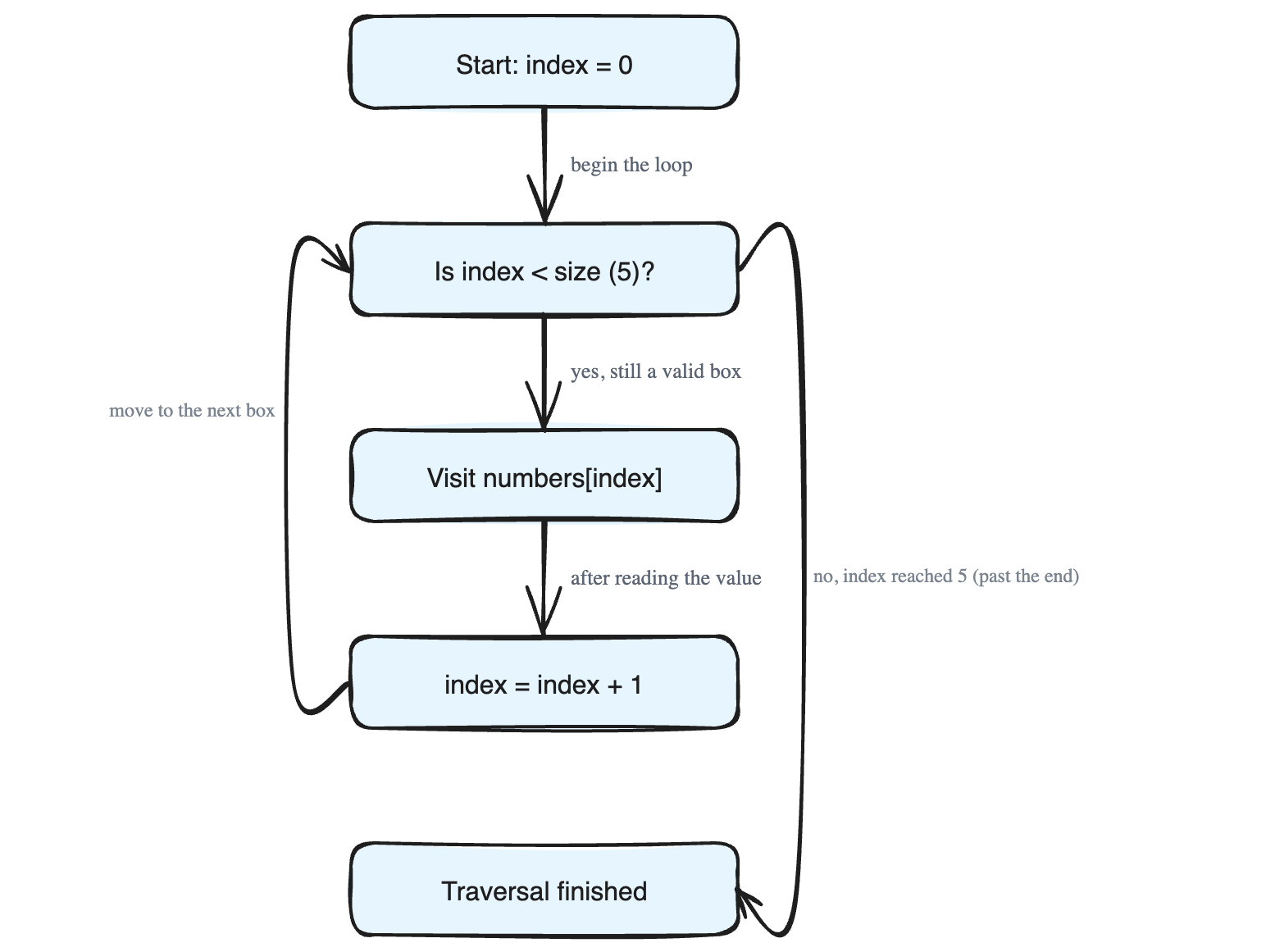
The idea is simple: use a counter variable as the index, start it at 0, and step it forward one box at a time. Picture the index pointer moving across the row:
index = 0 → look at numbers[0]
index = 1 → look at numbers[1]
index = 2 → look at numbers[2]
index = 3 → look at numbers[3]
index = 4 → look at numbers[4]
index = 5 → STOP (past the last box) — traversal finished
The loop keeps going while the index is still a valid box, and stops the moment it would step past the end. This is why you must know the array's size — it tells the loop when to stop. Walking off the end of an array reads memory that isn't yours, which causes bugs and crashes.
Here are three ways to traverse in C++:
int numbers[] = {1, 2, 3, 4, 5};
int size_n = 5;

// 1. Traversal using index-based for loop
for (int index = 0; index < size_n; index++) {
    cout << numbers[index] << " ";
}
cout << endl;

// 2. Traversal using range-based for loop (C++11+)
for (int value : numbers) {
    cout << value << " ";
}
cout << endl;

// 3. Traversal using pointer arithmetic
The first loop is the classic pattern: index starts at 0 and the condition index < size_n makes it stop right before going out of range. The second loop is a shortcut that hands you each value directly, so you don't manage the index yourself.
One last practical note: high-level languages give you a built-in way to ask an array "how long are you?", so you rarely track size by hand. In lower-level languages like C and C++, you are responsible for remembering the size — which is exactly what the size_n = 5 line is doing.